Welcome to the EGGhead Forum - a great place to visit and packed with tips and EGGspert advice! You can also join the conversation and get more information and amazing kamado recipes by following Big Green Egg to Experience our World of Flavor™ at:
Want to see how the EGG is made? Click to Watch
Facebook | Twitter | Instagram | Pinterest | Youtube | Vimeo
Share your photos by tagging us and using the hashtag #BigGreenEgg.
Share your photos by tagging us and using the hashtag #BigGreenEgg.
Want to see how the EGG is made? Click to Watch
Signature Image

egret
Posts: 4,190
I can't get rid of the image in my sig. I've gone to my profile and tried to do it there, but, when I click on the remove boxes and hit Save it gives me a message that photos aren't allowed in sigs.....!!
How do I remove this?
How do I remove this?
Comments
-
If you are talking about the Avitar Image go to profile and just tap the imagey and it will give you the option ....never seen an image on the signature line
edit, now I see it on my iPad.....See @Theophan post below seems the fixVisalia, Ca @lkapigian -
You've probably tried this, but I'd click in the text box for your signature and then hit Control-A or Command-A to "select all" just in case there's something there you don't see, and hit delete.
Then check the box that says "Strip images out of signatures."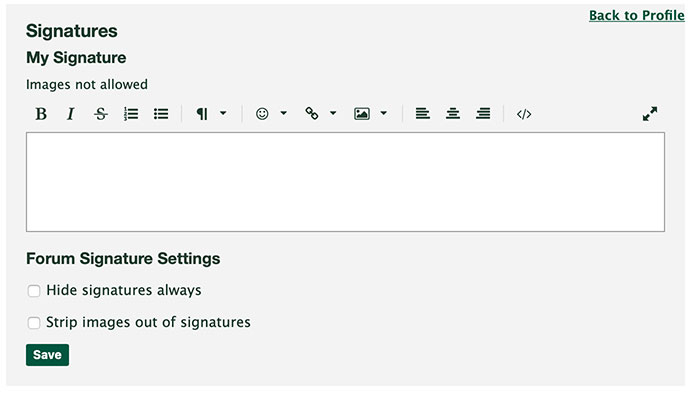
If you've already done those, I can't think of anything else, sorry. -
Got it !!! Thank you for your suggestions.


Categories
- All Categories
- 184.1K EggHead Forum
- 15.8K Forum List
- 460 EGGtoberfest
- 1.9K Forum Feedback
- 10.4K Off Topic
- 2.2K EGG Table Forum
- 1 Rules & Disclaimer
- 9K Cookbook
- 13 Valentines Day
- 93 Holiday Recipes
- 224 Appetizers
- 520 Baking
- 2.5K Beef
- 88 Desserts
- 167 Lamb
- 2.4K Pork
- 1.5K Poultry
- 33 Salads and Dressings
- 324 Sauces, Rubs, Marinades
- 548 Seafood
- 175 Sides
- 122 Soups, Stews, Chilis
- 44 Vegetarian
- 102 Vegetables
- 313 Health
- 292 Weight Loss Forum