Welcome to the EGGhead Forum - a great place to visit and packed with tips and EGGspert advice! You can also join the conversation and get more information and amazing kamado recipes by following Big Green Egg to Experience our World of Flavor™ at:
Want to see how the EGG is made? Click to Watch
Facebook | Twitter | Instagram | Pinterest | Youtube | Vimeo
Share your photos by tagging us and using the hashtag #BigGreenEgg.
Share your photos by tagging us and using the hashtag #BigGreenEgg.
Want to see how the EGG is made? Click to Watch
Maverick ET-733: How do you turn the alarms OFF?

Theophan
Posts: 2,656
I've used my Maverick 733 many times, and I've never set any alarms for temps going too high or too low. I just use it to see what the temps are, and I keep an eye on it.
For some reason, the last couple of times I've used it, the @#$ thing kept beeping at me because the temp was out of range, and I've been through the instructions several times and I cannot find out how to turn the blasted alarms OFF. I finally figured out how to SET the alarm and raise the target temp high enough that it won't go off, so that worked, but it was a pain. I just want to know how to turn the alarms OFF, and I can't see anything in the instructions that tells me how to do that.
Anybody know how?
Thanks!
For some reason, the last couple of times I've used it, the @#$ thing kept beeping at me because the temp was out of range, and I've been through the instructions several times and I cannot find out how to turn the blasted alarms OFF. I finally figured out how to SET the alarm and raise the target temp high enough that it won't go off, so that worked, but it was a pain. I just want to know how to turn the alarms OFF, and I can't see anything in the instructions that tells me how to do that.
Anybody know how?
Thanks!
Comments
-
Set your temps to a wide range (Like a Low of 32 and a high of 500 for both probes) if your not using the alarm functions and the alarms will stop.
Kirkland, TN2 LBGE, 1 MM -
I guess I'll have to do that if there's no other way, and thanks for the suggestion!The_Stache said:Set your temps to a wide range (Like a Low of 32 and a high of 500 for both probes) if your not using the alarm functions and the alarms will stop.
But what's driving me CRAZY is that I used this thing MANY times before and the alarm never went off! I can't figure out why it started going off now, and it seems like there must be a way the alarms are just "off" so you don't have to reset FOUR settings just to make the alarms stop going off. -
mines alot older unit but i think theres something wrong with yours. maverick has a really dumb setup procedure when turning them on where you set the temp and think its set which it is but you need to turn the alarm on after the alarm temp is set. yours seems outa whack, maybe call the company
fukahwee maineyou can lead a fish to water but you can not make him drink it -
Hit the button at the bottom left that has the dot with two waves coming off it. That turns on and off the audible alarm
Edit: on your screen it will show that same symbol if the audible alarms are activated and it won't show if they are deactivatedLarge BGEBBQ Guru DigiQ IIMartensville, Saskatchewan Canada -
This sounds right to me.bigalsworth said:Hit the button at the bottom left that has the dot with two waves coming off it. That turns on and off the audible alarm
Edit: on your screen it will show that same symbol if the audible alarms are activated and it won't show if they are deactivated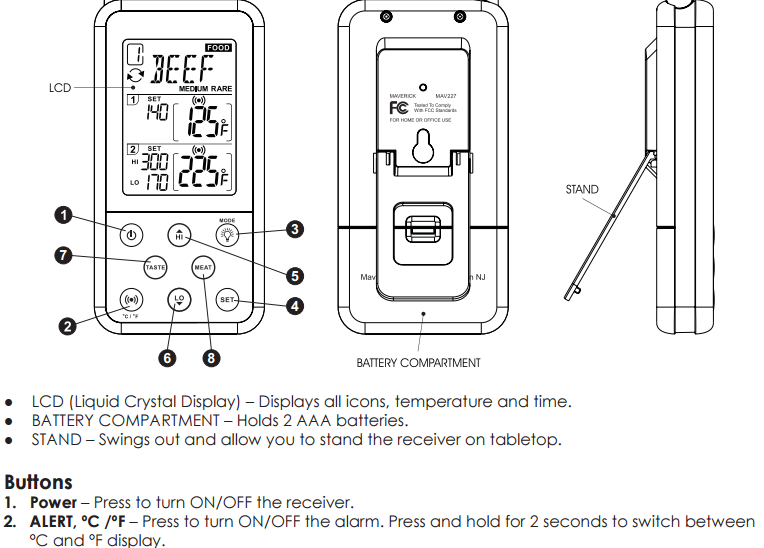
Found it here.Which came first the chicken or the egg? I egged the chicken and then I ate his leg. -
Too cool!!! THANKS to all y'all!!! Much appreciated! I'll try that next time I use it, and it sure looks like you nailed it -- MANY THANKS!
-
Yup, keep pushing that button until you don't see the alarm icon next to each of the two sensor readings. You can turn both on, both off, or either on.
I agree, those alarms are annoying. Should be a way to adjust volume or something.
However, I have to say once I got my Flame Boss, I rarely use the Maverick. That's easier to setup and provides the capability to adjust/maintain temperature remotely.
LBGE/Maryland -
I'm not sure why I'm so resistant to buying a controller. I'm happy not to have to go out to keep checking on the temp, but for some reason I haven't felt like "automating" the cooking. The Egg keeps temps so stable without a controller that I've never felt like it was a pain. I like being able to keep an eye on the temps from inside, but that's all I've wanted. Logically, I can't say it makes a lot of sense -- why not just have a device keep the temp where I want it? Dunno.KiterTodd said:Yup, keep pushing that button until you don't see the alarm icon next to each of the two sensor readings. You can turn both on, both off, or either on.
I agree, those alarms are annoying. Should be a way to adjust volume or something.
However, I have to say once I got my Flame Boss, I rarely use the Maverick. That's easier to setup and provides the capability to adjust/maintain temperature remotely.
-
I found it was harder to hear the alarms from the bottom of my trash can and I couldn't hear it at all once the truck hauled it away. That is one Thermo I didn't like right out of the box. They way overthought that one with all the stupid preset temps and alarms. I fussed with it for a couple of years and finally got mad at it one day.Keepin' It Weird in The ATX FBTX



Categories
- All Categories
- 184K EggHead Forum
- 16.1K Forum List
- 461 EGGtoberfest
- 1.9K Forum Feedback
- 10.5K Off Topic
- 2.4K EGG Table Forum
- 1 Rules & Disclaimer
- 9.2K Cookbook
- 15 Valentines Day
- 118 Holiday Recipes
- 348 Appetizers
- 521 Baking
- 2.5K Beef
- 90 Desserts
- 167 Lamb
- 2.4K Pork
- 1.5K Poultry
- 33 Salads and Dressings
- 322 Sauces, Rubs, Marinades
- 548 Seafood
- 175 Sides
- 122 Soups, Stews, Chilis
- 40 Vegetarian
- 103 Vegetables
- 315 Health
- 293 Weight Loss Forum