Welcome to the EGGhead Forum - a great place to visit and packed with tips and EGGspert advice! You can also join the conversation and get more information and amazing kamado recipes by following Big Green Egg to Experience our World of Flavor™ at:
Want to see how the EGG is made? Click to Watch
Facebook | Twitter | Instagram | Pinterest | Youtube | Vimeo
Share your photos by tagging us and using the hashtag #BigGreenEgg.
Share your photos by tagging us and using the hashtag #BigGreenEgg.
Want to see how the EGG is made? Click to Watch
Went from ATT to Comcast ISP, now Stoker won't connect

fusionhq
Posts: 1,707
I went thru the entire setup process and tried all my tricks, still can't get it to connect. Guess we're going old fashion on this one. Any ideas from people who've set this thing up with comcast?
Comments
-
i would think it's your router and not the ISP causing the issue. did you change your router?
-
It changed when I moved isp's. I never had an additional router, I just use the provided ones.
-
i think comcast provides a free security program, no? if so, try turning off the firewall and see what happens.
-
other things i could think of -- different type of security being used on the router, or incompatible band frequency b/wn router and stoker.
-
Yeah, not sure. This is the second time I've tried to use it with Comcast. Not working. I'm sure an IT pro could figure it out, but I'm just a dumb redneck trying to cook a brisket while I sleep. No big deal, I'll manage at this point, 8its just aggravating after paying $400 for this thing.
-
How did you get the Stoker to port forwarding through the ATT router? I couldn't get that to work on mine.
Edit: mine works on WiFi, not over the Internet.Aledo, Texas
Large BGE
KJ Jr.
Exodus 12:9 KJV
Eat not of it raw, nor sodden at all with water, but roast with fire; his head with his legs, and with the purtenance thereof. -
-
My Stoker is nothing more than a glorified Digi Q.....had it set up once , lasted a few months something changed and I've never been able to,aconnect it again. Repeated calls to Rocks...think I'm going to convert it to a paper weight and buy something a that doesn't require a degree in IT to set upVisalia, Ca @lkapigian
-
Heading out to do some furniture shopping. Apparently now that the family room is painted, the TV that was hanging over the fireplace now needs to be somewhere else. So, we need a new TV stand. Yeah, I don't get the connection either.
Anyway, I'll be back this afternoon and I'm sure we can get it figured out.They/Them
Morgantown, PA
XL BGE - S BGE - KJ Jr - HB Legacy - BS Pizza Oven - 30" Firepit - King Kooker Fryer - PR72T - WSJ - BS 17" Griddle - XXL BGE - BS SS36" Griddle - 2 Burner Gasser - Pellet Smoker -
I just switched to att this week too. I don't have a stoker but did have to dig into the routers settings for some other stuff. If you have the same setup as me, the IP is 10.0.0.1 and login is admin / password. From there you can set up port forwarding which I don't know anything about. Good luck!
coming from Wow, Comcast is amazing - internet is so much faster!Chicago, IL - Large and Small BGE - Weber Gasser and Kettle -
I don't own one, but I see the website has a WiFi setup video.
Link to Video
I have Comcast, but I have my own Motorola modem/router. The security is PSK.
I am guessing, but one problem could be that that DHCP is turned off. If it was turned off for the old router, it might have to be turned on again. For example, if your old network IP addresses started with 192.168.1... and they now need to start out with 192.168.0..., your router would likely never be able to see the unit even with the Ethernet cable attached for the initial WiFi setup.Large BGE
Minneapolis, MN -
@fusionhq - so you can't get the Stoker to join your WiFi network or you can't connect to your Stoker remotely? Trying to understand. Let me know. We should be able to work this out as it is fairly easy.fusionhq said:I went thru the entire setup process and tried all my tricks, still can't get it to connect. Guess we're going old fashion on this one. Any ideas from people who've set this thing up with comcast?
A general recommendation to cable ISP users, ditch the cable companies modem and buy your own. Then but your own router. Much more control and easier to manage. Not to mention you won't have to pay a modem monthly rental fee. Paid for itself in less than 8 months for me...going on year 3 with same modem.
@fusionhq - waiting to hear back from you. I'll be in and out today.Joe - I'm a reformed gasser-holic aka 4Runner Columbia, SC Wonderful BGE Resource Site: http://www.nakedwhiz.com/ceramicfaq.htm and http://www.nibblemethis.com/ and http://playingwithfireandsmoke.blogspot.com/2006/02/recipes.html
What am I drinking now? Woodford....neat -
Yep, answers to those questions will help us figure out where the issue is.4Runner said:
@fusionhq - so you can't get the Stoker to join your WiFi network or you can't connect to your Stoker remotely? Trying to understand. Let me know. We should be able to work this out as it is fairly easy.fusionhq said:I went thru the entire setup process and tried all my tricks, still can't get it to connect. Guess we're going old fashion on this one. Any ideas from people who've set this thing up with comcast?
A general recommendation to cable ISP users, ditch the cable companies modem and buy your own. Then but your own router. Much more control and easier to manage. Not to mention you won't have to pay a modem monthly rental fee. Paid for itself in less than 8 months for me...going on year 3 with same modem.
@fusionhq - waiting to hear back from you. I'll be in and out today.They/Them
Morgantown, PA
XL BGE - S BGE - KJ Jr - HB Legacy - BS Pizza Oven - 30" Firepit - King Kooker Fryer - PR72T - WSJ - BS 17" Griddle - XXL BGE - BS SS36" Griddle - 2 Burner Gasser - Pellet Smoker -
Change ISP shouldn't have anything to do with it unless Comcast is blocking the port used. Check you default gateway. Example, if you used a 192.168.1.0 network on the old was the default gateway 192.168.1.1 or some use 192.168.1.254. I'd start by hopping on a PC and accessing the new modem/router and checking the default gateway or go to a command prompt and run "ipconfig /all". You may be using a 10. network now...~ John - Formerly known as ColtsFan - https://www.instagram.com/hoosier_egger
XL BGE, LG BGE, Med BGE, BGE Chiminea, Ardore Pizza Oven
Bloomington, IN - Hoo Hoo Hoo Hoosiers! -
But I suspect he now has a new modem/router so a whole new network. Stoker, as well as any other device, needs to be configured to connect. I'm speculating a bit.Joe - I'm a reformed gasser-holic aka 4Runner Columbia, SC Wonderful BGE Resource Site: http://www.nakedwhiz.com/ceramicfaq.htm and http://www.nibblemethis.com/ and http://playingwithfireandsmoke.blogspot.com/2006/02/recipes.html
What am I drinking now? Woodford....neat -
Thanks guys! I can access my Comcast router at 10.0.0.1, and I can connect and control the stoker via Ethernet, at an assigned port 10.0.0.169. However, I cannot get the wireless to be recognized. Not sure what it is. I have knowledge of IT, but it's limited. I'm hoping it's something easy, but got tired of screwing with it. Right now it's a paper weight. Good news is that my brisket looks good!! Anyone willing to help, I really appreciate it.
-
Connect to the stoker via ethernet and pull up the stoker wifi setup page. In there, you will tell the stoker your network name and password.
Yours would be 10.0.0.169/wifi.html
Stoker WiFi manual: https://www.rocksbarbque.com/PDF/WiFiManual2012rev2.pdf
Hope this is your solution.Joe - I'm a reformed gasser-holic aka 4Runner Columbia, SC Wonderful BGE Resource Site: http://www.nakedwhiz.com/ceramicfaq.htm and http://www.nibblemethis.com/ and http://playingwithfireandsmoke.blogspot.com/2006/02/recipes.html
What am I drinking now? Woodford....neat -
You didn't say anything about this when we were conversing. What did you end up doing? Should be able to just readdress it...no? Hook it up to the computer and just do a completely new startup.
LBGE 2013 & MM 2014Die Hard HUSKER & BRONCO FANFlying Low & Slow in "Da Burg" FL -
That's where I made my mistakes. You don't hook the stoker to the computer, you hook it to the router, then access it through the computer. The internet settings need to be reset, plug the stoker into the router and it assigns the IP address then you type that into the browser. I kept plugging the stoker into my laptop and was getting frustrated. Finally read the instructions all the way through.NPHuskerFL said:You didn't say anything about this when we were conversing. What did you end up doing? Should be able to just readdress it...no? Hook it up to the computer and just do a completely new startup.Bill Denver, CO
XL, 2L's, and MM -
Also, I found that on my phone I have to earase cookies sometimes to access it. My iPhone 'outsmarts' me. If I put the address in the browser before the stoker finishes booting up it defaults me to the router system page. If I wait for the stoker to finish booting and clear my cookies it comes right up. I think it's an iPhone issue not a stoker issue.Bill Denver, CO
XL, 2L's, and MM -
@BilZol - good point on connecting the stoker to your network via the ethernet and not to your computer. I never thought of it that way. The key is to get your stoker on your network via a wired connection so you can can then connect to it via your browser and configure it for wireless.Joe - I'm a reformed gasser-holic aka 4Runner Columbia, SC Wonderful BGE Resource Site: http://www.nakedwhiz.com/ceramicfaq.htm and http://www.nibblemethis.com/ and http://playingwithfireandsmoke.blogspot.com/2006/02/recipes.html
What am I drinking now? Woodford....neat -
You can connect the Stoker directly to the computer to change the settings but you have to reset it back to factory defaults first.Aledo, Texas
Large BGE
KJ Jr.
Exodus 12:9 KJV
Eat not of it raw, nor sodden at all with water, but roast with fire; his head with his legs, and with the purtenance thereof. -
@NPHuskerFL I ran it normal, no controller. It held great 250 for HOURS.
Im willing to get the stoker going again, but it's currently for sale. Make an offer. -
Directions clearly indicate to get the stoker on your network and to plug it in to your router/switch/etc. Not saying the computer route won't work, but you are on your own that way.
@fusionhq - what is your status? Just thought of you as I'm smoking 6 butts and have the Stoker running. Also, just did a firmware update via WiFi. Easy and fast. On your Stoker page, do you see this? The "wifi parameters" link. This is somewhat new. Otherwise, you need to go to the wifi page I posted earlier in this thread. Just trying to help. Let me know.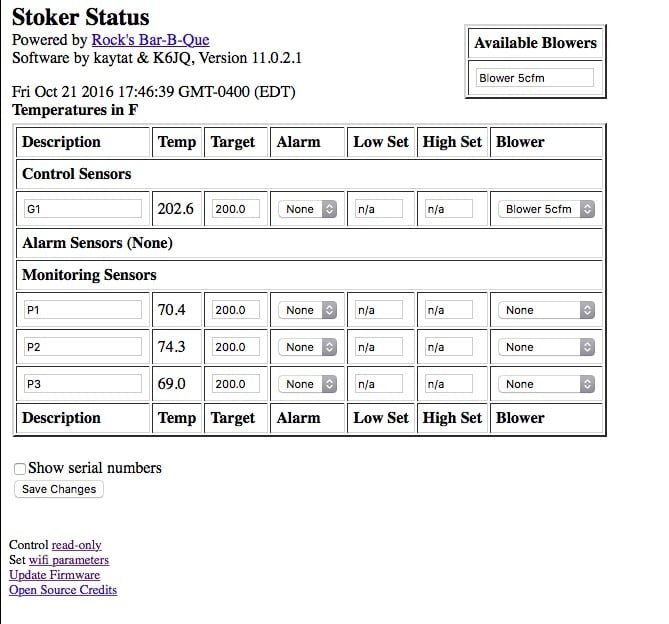
Joe - I'm a reformed gasser-holic aka 4Runner Columbia, SC Wonderful BGE Resource Site: http://www.nakedwhiz.com/ceramicfaq.htm and http://www.nibblemethis.com/ and http://playingwithfireandsmoke.blogspot.com/2006/02/recipes.html
What am I drinking now? Woodford....neat -
4Runner, been gone for a week or so. May mess with it this coming week. Will check






Categories
- All Categories
- 184K EggHead Forum
- 16.1K Forum List
- 461 EGGtoberfest
- 1.9K Forum Feedback
- 10.5K Off Topic
- 2.4K EGG Table Forum
- 1 Rules & Disclaimer
- 9.2K Cookbook
- 15 Valentines Day
- 118 Holiday Recipes
- 348 Appetizers
- 521 Baking
- 2.5K Beef
- 90 Desserts
- 167 Lamb
- 2.4K Pork
- 1.5K Poultry
- 33 Salads and Dressings
- 322 Sauces, Rubs, Marinades
- 548 Seafood
- 175 Sides
- 122 Soups, Stews, Chilis
- 40 Vegetarian
- 103 Vegetables
- 315 Health
- 293 Weight Loss Forum